
Free WordPress plugin
Verify people before WordPress creates their account.
HDYHaus Identity Verification adds identity verification to the native WordPress registration flow. WordPress creates an account only after your server confirms a successful verification.
Requires a Prembly account and configured verification widget. Prembly account and service terms apply separately.
Why it exists
A verified identity should come before a user account.
An email address alone does not establish who is registering. HDYHaus Identity Verification adds identity verification before the account exists, so you can require a confirmed identity from the start.
- Block account creation when verification is missing or cannot be confirmed.
- Check the provider result on your server before allowing registration.
- Keep the native WordPress form and password-setup email flow.
What it does
Identity verification, built into registration.
A focused gate for native WordPress account creation.
Server confirmation
Check the status, session ID, widget configuration, and registrant email before creating an account.
One identity, one account
Prevent reuse of a completed session or verified document identity, even after account deletion.
Explicit consent
Display your consent wording and provider policy links before a registrant starts verification.
Separate environments
Keep Sandbox and Live widget settings separate while testing your registration flow.
WordPress privacy tools
Export and erase verification metadata through WordPress personal-data tools.
Provider adapters
Use Prembly as the first supported provider, with an adapter interface for developers.
Who it is for
For sites that need to know who is joining.
For single-site WordPress communities and service portals where new accounts need a confirmed identity. Developers can add it to an existing native registration flow.
- Works with
wp-login.php?action=register. - WooCommerce, BuddyPress, MemberPress, Ultimate Member, and other custom registration forms are not currently supported.
- Multisite and network activation are not currently supported.
How it works
Verification comes before account creation.
1
Register
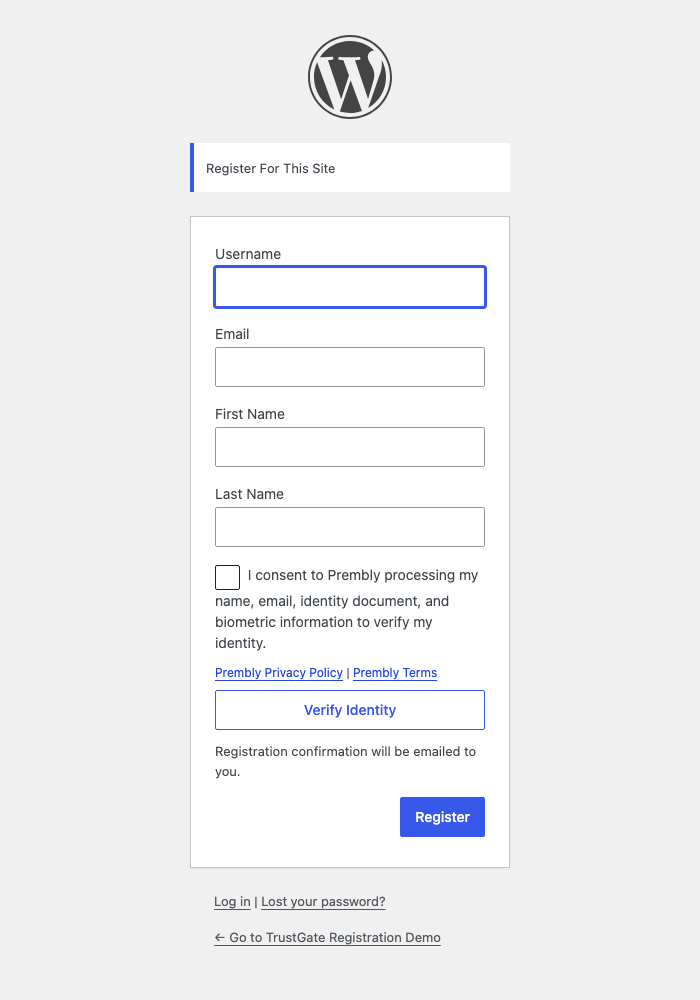
The person enters their username, name, and email on the native WordPress registration screen.
2
Consent
They accept the displayed consent before opening the verification provider.
3
Verify
Prembly performs the identity checks selected by the site owner.
4
Confirm
WordPress confirms the session on the server, creates the account, and sends the password-setup email.
Getting started
Connect Prembly to your registration flow.
- Download the ZIP. Open Plugins > Add New Plugin > Upload Plugin, upload, install, and activate HDYHaus Identity Verification.
- Enable Settings > General > Anyone can register.
- In Prembly, create separate SDK Setup widgets for Sandbox and Production as needed.
- Open Identity Verification > Settings > Prembly. Enter the matching SDK Setup Widget Key and Configuration ID.
- Choose Sandbox or Live, enable Prembly, and review the consent wording, provider policy links, and website privacy policy.
- Open Identity Verification > Registration to customize the consent message, provider policy URLs, and website terms or disclaimer link.
- Add identity verification information to the site privacy policy. Suggested text is available under Settings > Privacy.
- Test successful verification, blocked unverified registration, and password-setup emails before opening registration to visitors.
Verification data
Documents stay with your verification provider.
Prembly processes identity documents and verification checks. HDYHaus Identity Verification stores normalized verification and consent metadata in WordPress, including a session reference and site-specific one-way fingerprints.
- Document images, document numbers, selfies, biometric information, and full provider reports are not copied into WordPress.
- Verification metadata works with WordPress personal-data export and erasure tools.
- One-way session and identity fingerprints remain after erasure or account deletion to prevent reuse.
Requirements
Check your site before installing.
WordPress
Version 6.4 or newer.
PHP
Version 8.1 or newer.
Registration
Native WordPress, single-site.
Prembly
SDK Widget Key and Configuration ID.
No Prembly Secret API Key, Organisation ID, or App ID is required for this integration.
Know who is joining your WordPress site.
Download HDYHaus Identity Verification and test your verification flow before opening registration to visitors.